
What MAS and Massgrave are
Microsoft Activation Scripts (MAS) is an open-source collection of batch scripts that activate Windows and Office using several different licensing techniques. Massgrave is the project that develops and publishes them.
This website, massgrave.download, is an independent documentation resource. It is not affiliated with or operated by the Massgrave project, and it does not host its own build of the scripts. The project publishes everything itself:
- Official website — massgrave.dev
- Official repository — github.com/massgravel/Microsoft-Activation-Scripts
- Official releases
- Azure DevOps mirror / self-hosted Git mirror
What this site adds: a method-by-method comparison, a release table read live from the repository, verification guidance, an error-code decoder and a growing troubleshooting library.
An open-source Windows and Office activator featuring HWID, Ohook, TSforge, and Online KMS activation methods, along with advanced troubleshooting.
Activation Methods
Method 1: PowerShell (Recommended)
This method is the most convenient and works on Windows 8.1, 10, and 11.
- Click the Start Menu, type
PowerShell, and open it. - Copy and paste the code below and press Enter.
irm https://get.activated.win | iex
- In the menu that appears, type the number corresponding to one of the Green options.
Troubleshooting the PowerShell method
If the command is blocked: Some ISPs block the URL. Use this command to bypass DNS blocks (Windows 10/11 only):
iex (curl.exe -s --doh-url https://1.1.1.1/dns-query https://get.activated.win | Out-String)
If you receive a TLS/SSL Error (Older Windows): If you are on an old build of Windows 8.1 or 10, run this command before the main command:
[Net.ServicePointManager]::SecurityProtocol=[Net.SecurityProtocolType]::Tls12
Method 2: Traditional (Offline)
Use this method if you prefer downloading a file or cannot use the PowerShell method.
- Download the script: MAS_AIO.cmd
- Run the
MAS_AIO.cmdfile. - In the menu that appears, type the number corresponding to one of the Green options.
- If your antivirus blocks the file, temporarily disable it.
Tips
- Some ISPs and DNS providers block access to the project's domains. You can bypass this by enabling DNS-over-HTTPS (DoH) in your browser.
- Having trouble? Open the troubleshooting guide.
- To activate additional products such as Office for macOS, Visual Studio, RDS CALs, and Windows XP, see the unsupported products activation guide.
- To run the scripts in unattended mode, see the command line switches reference.
Notes
- The
irmcommand in PowerShell downloads a script from a specified URL, and theiexcommand executes it. - Always double-check the URL before executing the command and verify the source is trustworthy when manually downloading files.
- Be cautious of third parties spreading malware disguised as MAS by altering the URL in the PowerShell command. See how to verify what you run.
- No password is required for any download on this site.
Features
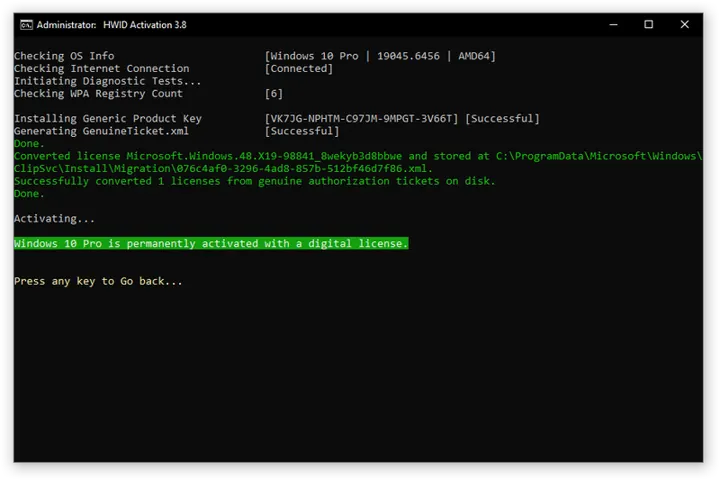
- HWID (Digital License): Permanently activate Windows.
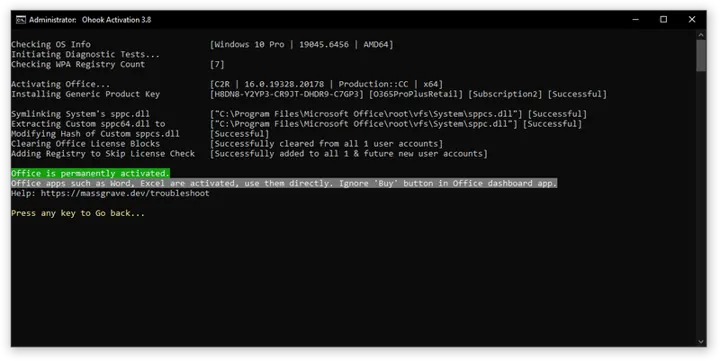
- Ohook: Permanently activate Office.
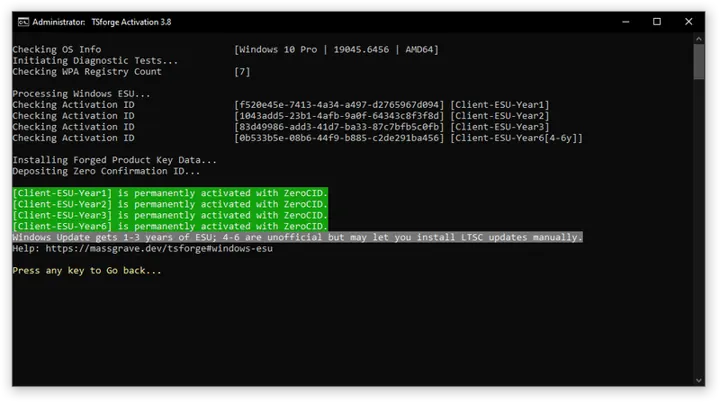
- TSforge: Permanently activate Windows, ESU, and Office.
- Online KMS: Activate Windows/Office for 180 days (Lifetime with renewal task).
- Advanced activation troubleshooting.
- $OEM$ folders for pre-activation.
- Change Windows edition.
- Change Office edition.
- Check Windows/Office activation status.
- Available in All-In-One and separate file versions.
- Fully open source and based on batch scripts.
- Fewer antivirus detections.
Activations Summary
| Activation Type | Supported Product | Activation Period | Is Internet Needed? |
|---|---|---|---|
| HWID | Windows 10-11 | Permanent | Yes |
| Ohook | Office | Permanent | No |
| TSforge | Windows / ESU / Office | Permanent | Yes, needed on build 26100 and later |
| Online KMS | Windows / Office | 180 Days (Lifetime with renewal task) | Yes |
For more details, see the respective pages in the documentation and the activation comparison chart. To activate unsupported products such as Office on Mac, see the unsupported products activation guide.
Documentation on this site
- Activation methods compared — HWID, Ohook, TSforge, KMS38 and Online KMS side by side
- MAS version history — every published release, read live from the repository
- Security and verification — checking that a copy really came from the project
- Troubleshooting — when activation fails
- Glossary — HWID, GVLK, OSPP, ESU and the rest, in plain English
- FAQ — the questions that come up most
- About this site — how information here is sourced and corrected
Site Map
Browse the full list of pages on this site: /sitemap.xml
Screenshots
In-Depth Guides
- Windows Activation Guide — HWID, KMS38, TSforge, Online KMS
- Office Activation Guide — Ohook, OSPP, KMS for 2013–2024 / 365
- HWID Activation Deep Dive — Digital License explained
- KMS Activation Explained — KMS38 and Online KMS
- TSforge Activation — Permanent activation method
- Ohook Activation for Office — DLL hook activation
- Troubleshooting Hub — Error codes, antivirus, network
- MAS vs Alternatives — vs KMSPico, HWIDGen, KMSAuto
Free Tools
- Activation Error Decoder — paste any 0x… code, get the MAS fix
- KMS Client Setup Keys — all GVLKs, one-click copy
- Activation Status Checker — slmgr & ospp commands
- Windows Edition Converter — Home → Pro → Enterprise → LTSC paths
- Browse all tools
- Activation Glossary — every term explained
- MAS Changelog — every release dated